
Commercial displays are no longer limited to short presentations or occasional meetings.
Today, interactive flat panels, digital signage systems, conference room displays, retail screens, and other commercial display solutions may operate for many hours every day. In some environments, the computing system behind the display may need to remain available for extended periods or support continuous operation.
This creates different requirements for the computer inside the display.
A commercial OPS PC needs to provide more than sufficient processing power. It also needs to offer stable performance, effective thermal management, reliable storage, appropriate connectivity, and easy maintenance.
So, what makes an OPS PC suitable for 24/7 commercial display applications?
The answer is not one particular processor or specification. Instead, reliability comes from the design of the entire system.

1. Thermal Management Is Critical for Long-Term Operation
Heat is one of the most important factors affecting computer stability.
When an OPS PC operates for long periods, the processor, memory, SSD, and other components continuously generate heat. If that heat is not effectively dissipated, system temperature can increase and potentially affect performance and component lifespan.
For this reason, thermal design should be one of the first things to consider when selecting an OPS PC for commercial applications.
A well-designed OPS computer module should consider:
Airflow
Heatsink design
Fan configuration
Ventilation openings
Internal component layout
CPU thermal performance
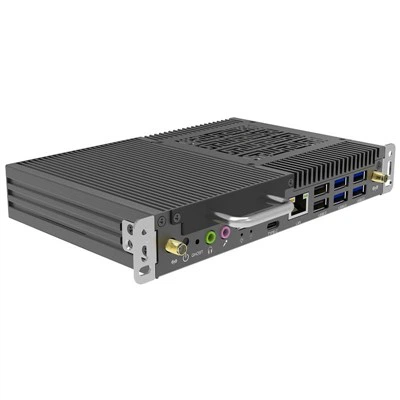
HJS's OPS products use dedicated cooling designs, including dual-fan heat dissipation on some models, and the company's product information specifies operating temperatures of -20°C to 60°C for its HJS OPS Desktop PC.
However, buyers should always evaluate thermal performance according to the specific OPS model and actual installation environment rather than assuming that every OPS PC is suitable for every 24/7 application.
2. Stable Performance Matters More Than Peak Performance
For commercial displays, the fastest processor is not necessarily the most important factor.
A digital signage system may need to display content continuously.
A conference room display may be used for several meetings every day.
An interactive classroom may operate throughout the school day.
In these situations, consistent and stable performance can be more important than short bursts of maximum processing power.
A properly configured commercial OPS PC should provide enough performance for the intended workload while maintaining stable operation over extended periods.
Depending on the application, this could include:
Digital signage playback
Interactive teaching
Video conferencing
Microsoft Office
Web applications
Multimedia playback
Enterprise software
Multiple applications running simultaneously
This is why OPS PC selection should start with the actual application rather than simply choosing the highest available CPU.
3. Storage Reliability Should Not Be Overlooked
The storage device is another important part of a commercial OPS PC.
For everyday consumer use, storage performance may mainly affect boot time and application loading.
In commercial applications, however, the computer may continuously access operating system files, applications, media content, logs, and other data.
An OPS PC for commercial display applications should therefore use reliable SSD storage with an appropriate capacity for the workload.
Depending on the project, customers may need:
256GB SSD
512GB SSD
1TB SSD
NVMe storage
Additional storage expansion
HJS OPS platforms include M.2 storage interfaces supporting PCIe/SATA protocols on selected models, providing flexibility for different project configurations.
For large deployments, buyers should also consider how replacement storage and system recovery will be handled over the product lifecycle.
4. Connectivity Is Important in Commercial Display Systems
A commercial display rarely works as a completely standalone device.
It may need to communicate with:
Network infrastructure
Touch interfaces
External cameras
USB peripherals
Audio equipment
External displays
Control systems
Wireless networks
Therefore, connectivity should be considered when selecting an OPS PC Module.
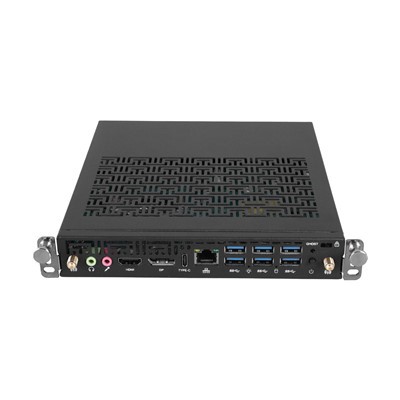
Depending on the model, common interfaces may include:
HDMI
DisplayPort
USB
USB Type-C
Gigabit Ethernet
Wi-Fi
Bluetooth
Audio interfaces
For example, HJS's OPS Desktop PC supports HDMI 2.0, DisplayPort, USB, Type-C, Gigabit Ethernet, Wi-Fi, and Bluetooth options.
The exact interfaces required will depend on the interactive display and application.
For system integrators, checking the complete I/O configuration before placing an order can prevent compatibility problems during installation.
5. A Modular Design Makes Maintenance Easier
One of the biggest advantages of the OPS architecture is its modular design.
Instead of using a completely separate external computer, an OPS Computer Module can be installed directly into a compatible interactive display.
This provides an important advantage for commercial deployments.
If the computing module requires maintenance or replacement, technicians can service the computer module without replacing the entire interactive display.
This can be particularly useful when deploying dozens or hundreds of displays.
For example, imagine a company has installed 100 interactive displays across different meeting rooms.
If one computer fails, replacing the entire display would be expensive and disruptive.
A replaceable OPS module provides a more practical maintenance approach.
This modular architecture is one of the reasons OPS remains relevant for professional display systems. HJS also highlights installation, maintenance, and upgrade flexibility as key features of its OPS solutions.
6. Long-Term Product Availability Matters for Large Projects
Reliability is not only about whether a computer can run for a long time.
For commercial projects, buyers should also think about what happens two, three, or even five years after deployment.
Large projects often require consistent hardware configurations.
For example:
A customer may purchase 100 OPS PCs today and need another 100 units next year.
If the original configuration is no longer available, maintaining the same hardware across the deployment can become difficult.
This is why commercial customers should consider:
Product lifecycle
Component availability
Spare units
Technical support
Replacement options
Configuration consistency
For OEMs, distributors, and system integrators, these factors can be just as important as the initial purchase price.
7. The OPS PC Should Match the Display and Application
A reliable OPS PC is not simply a powerful computer placed inside an interactive display.
The computer needs to match the display's mechanical and electrical requirements.
Before purchasing, customers should confirm:
OPS Compatibility
Check whether the display uses the appropriate OPS form factor and connector.
Power Requirements
The OPS module must be compatible with the display's power specifications.
Display Output
Confirm the required resolution and refresh rate for the application.
Touch and USB Support
Make sure the OPS module can communicate correctly with the display's touch and peripheral interfaces.
Physical Dimensions
The OPS module must fit correctly into the display's dedicated slot.
HJS offers both standard OPS and OPS-C product categories, so compatibility should always be confirmed before ordering.
8. Customization Can Be Important for Commercial Projects
Not every commercial display project has the same requirements.
A digital signage project may prioritize multimedia playback and network connectivity.
A smart classroom may require interactive software and touch support.
A corporate meeting room may need video conferencing and enterprise management.
An OEM display manufacturer may have completely different mechanical, BIOS, interface, or branding requirements.
This is where OPS PC customization becomes valuable.
Depending on the project, customers may need different:
Intel processor platforms
RAM configurations
SSD capacities
Wireless modules
I/O interfaces
Operating systems
BIOS settings
Mechanical designs
Branding requirements
HJS provides OEM/ODM customization for global customers and offers multiple OPS platforms and configurations. The company currently lists standard OPS, OPS-C, and customized OPS PC solutions on its website.
9. Where Are 24/7 Commercial OPS PCs Used?
OPS PCs can support a wide range of commercial display applications.
Digital Signage
Retail stores, transportation facilities, restaurants, corporate buildings, and public spaces may require displays to operate for long periods.
Interactive Flat Panels
Schools, training centers, and businesses can use OPS PCs to provide Windows-based computing for interactive displays.
Conference Rooms
Meeting rooms may require stable computing for video conferencing, presentations, collaboration software, and digital content.
Retail Displays
Interactive product information, promotional content, and customer engagement applications can require a reliable computing platform.
Control and Industrial Environments
Some professional environments require computers to operate continuously while maintaining stable network and display connectivity.
The actual operating schedule and environmental requirements should always be evaluated for each project.
What Should You Look for in a 24/7 OPS PC?
When evaluating an OPS PC for commercial use, don't focus on the processor alone.
A better checklist includes:
1. Thermal Design
Can the system effectively manage heat during extended operation?
2. Stable Hardware Configuration
Are the CPU, memory, storage, and other components appropriate for the workload?
3. Reliable Storage
Is the SSD suitable for the expected usage?
4. Connectivity
Does the OPS PC provide the interfaces required by the display and peripherals?
5. Compatibility
Does the module match the interactive display's OPS specification?
6. Maintainability
Can the module be replaced or serviced efficiently?
7. Long-Term Support
Can the supplier provide consistent products and technical support for the project lifecycle?
8. Customization
Can the supplier adapt the configuration for different commercial applications?
This approach is more useful than simply asking:
"Which OPS PC has the most powerful processor?"
Why Choose HJS for Commercial OPS PC Projects?
HJS Technology Group specializes in the development and manufacturing of OPS PCs, Mini PCs, AIO PCs, ITX motherboards, and industrial PCs.
The company states that it was founded in 2009 and has more than 200 employees, including 30 R&D engineers. Its manufacturing facilities cover approximately 20,000 square meters and include three SMT production lines. HJS also provides OEM/ODM customization and a three-year warranty.
For OPS PC projects, HJS offers multiple Intel-based platforms and configurations covering different performance requirements and commercial applications. Its product portfolio includes solutions for interactive displays, education, conference rooms, digital signage, and other commercial environments.
For customers planning long-term commercial display deployments, the ability to customize the hardware and maintain consistent configurations can be an important part of the overall solution.
Frequently Asked Questions
Can an OPS PC run 24/7?
Some OPS PCs are designed and specified for extended or continuous operation, but 24/7 suitability depends on the specific model, thermal design, workload, installation environment, and operating conditions. Always confirm the manufacturer's specifications before deploying an OPS PC in a continuous-operation application.
What is the most important factor for a 24/7 OPS PC?
There is no single factor. Thermal management, hardware stability, storage reliability, power design, component selection, and the operating environment all contribute to long-term reliability.
Is an OPS PC suitable for digital signage?
Yes. OPS PCs can provide the computing platform for digital signage systems, particularly when the application requires Windows, professional software, high-resolution media playback, or more flexible hardware configurations.
How can an OPS PC be maintained?
The modular design allows a compatible OPS computer module to be removed and replaced more easily than a conventional external PC installation. However, the specific maintenance procedure depends on the display and OPS design.
Conclusion
A commercial OPS PC needs to do more than deliver high computing performance.
For applications that operate for long hours, thermal management, stable hardware, reliable storage, connectivity, compatibility, maintainability, and long-term product support are all important.
The best 24/7 OPS PC is therefore not necessarily the one with the highest specification. It is the one that is properly matched to the application, display, operating environment, and expected lifecycle.
For interactive displays, digital signage, conference systems, education, and other commercial applications, a well-designed OPS PC Module can provide a flexible computing platform while making installation, maintenance, and future upgrades easier.
For OEMs, distributors, and system integrators, working with an experienced OPS PC manufacturer can also make it easier to develop a stable configuration that meets the specific requirements of a long-term commercial display project.